

Amazon is one of the most influential platforms in the world and has forever revolutionized the buying and selling of any kind of product. Never before Amazon has experienced such success as in this period, due to the possibility of selling products online with delivery. In 2020, knowing how to create a Deep Link to Amazon is essential to be able to take advantage of digital marketing.
Amazon began its adventure by selling books online in digital or paper format, in the following years it began to expand into new sectors, becoming the commercial giant that capitalized the world market in 2020, reaching a turnover of over 87 billion in 2019. ( Source: Forbes)
At present, Amazon does not only deal with selling items and products, it provides many other services including the Affiliate Program and the ability to launch dedicated Ads. It is possible to sell your products through Amazon.
These services give people the opportunity to get rich through Amazon, but only if they have the appropriate digital marketing tools to take full advantage of this opportunity.
JotUrl offers many tools and strategies to improve the sale of your products online, you can find all the information you need here.
In this article we will focus more on studying exactly how to create a Deep Link to Amazon in the most effective and simple way.

Why Deep Linking to Amazon is so important.
Amazon is one of the most influential platforms within the digital market. Creating Deep Link to Amazon can bring many benefits.
First of all, it will give you the opportunity to fully exploit the potential of Amazon even in the mobile version.
It will also offer you the best tool to manage traffic and visits to your content.
By creating a Deep Link to Amazon with JotUrl you will have the possibility to track every event and conversion with extreme precision, recording essential information about your users.
- Origin
- Device used
- Operating system used
- Browser
- Language
Each of these data can give you very useful data to develop new marketing campaigns tailored to your users. Understanding which specific event triggers a conversion will also give you new elements to improve the sale of your products.
Finding the way to redirect users to Amazon can bring immense gains. If you have products on Amazon that you want to sell, or are completing your affiliate program, you will definitely need to increase your conversion rate.
The more users who are directed to your product pages, the better the chances of conversion. The more products you sell, the better your earnings will be – whether you are selling directly on Amazon or participating in the Affiliate program.
A lot of people use Amazon to buy products online, the secret is to drive that traffic to YOUR products.
To do this, you can apply many tricks:
– create ADS on social networks
– create CTAs on third-party pages
– take advantage of retargeting pixels
Creating a Deep Link to Amazon is one of the best strategies at your disposal to bring users wandering online within your product pages.
What is Deep Linking?
Deep Linking is a powerful technology developed in the digital marketing sector that allows users to be redirected within a specific landing page, bypassing homepages and other intermediate pages.
This technology has become extremely useful for improving marketing even on mobile platforms, boosting and revolutionizing the browsing experience of users.
So yes, Deep Linking also works within the Mobile Apps, not only on desktop.
Deep Linking can be used for any application, including social network apps or your company’s app.
As we already said, JotUrl has developed a feature that can simply create Deep Links to all major media, including Amazon.
The easiest way to create a Deep Link to Amazon
JotUrl has developed a truly revolutionary feature called Easy Deep Link, creating your Deep Link to Amazon will take just a few clicks.
In order to successfully create your Deep Link to Amazon, follow the instructions below.
Go to your Amazon product page.
We use this MSI computer page as an example for this article.

Copy that URL, don’t worry about the length! You can short your link at any time with JotUrl.
By creating your new Deep Link you can check the analytics related to the URL and view more carefully all the information relating to the people who will view your account, or that of your company.
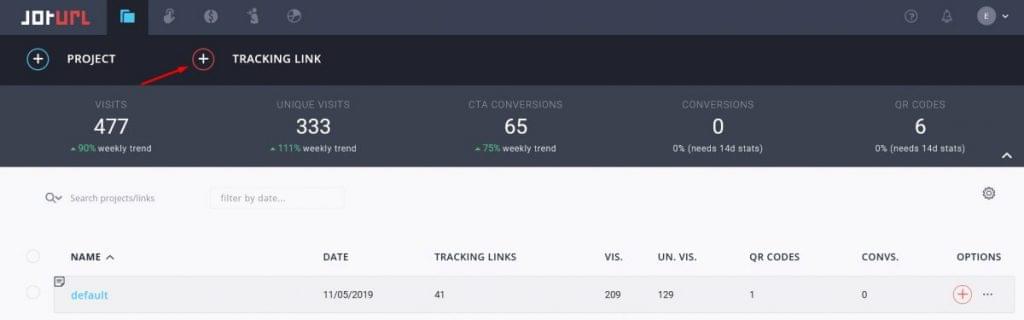
Enter the JotUrl Dashboard and create a new Tracking Link to create the Deep Link to Amazon you need. Just click the (+) TRACKING LINK button.
Fill in the form for your new Tracking Link.
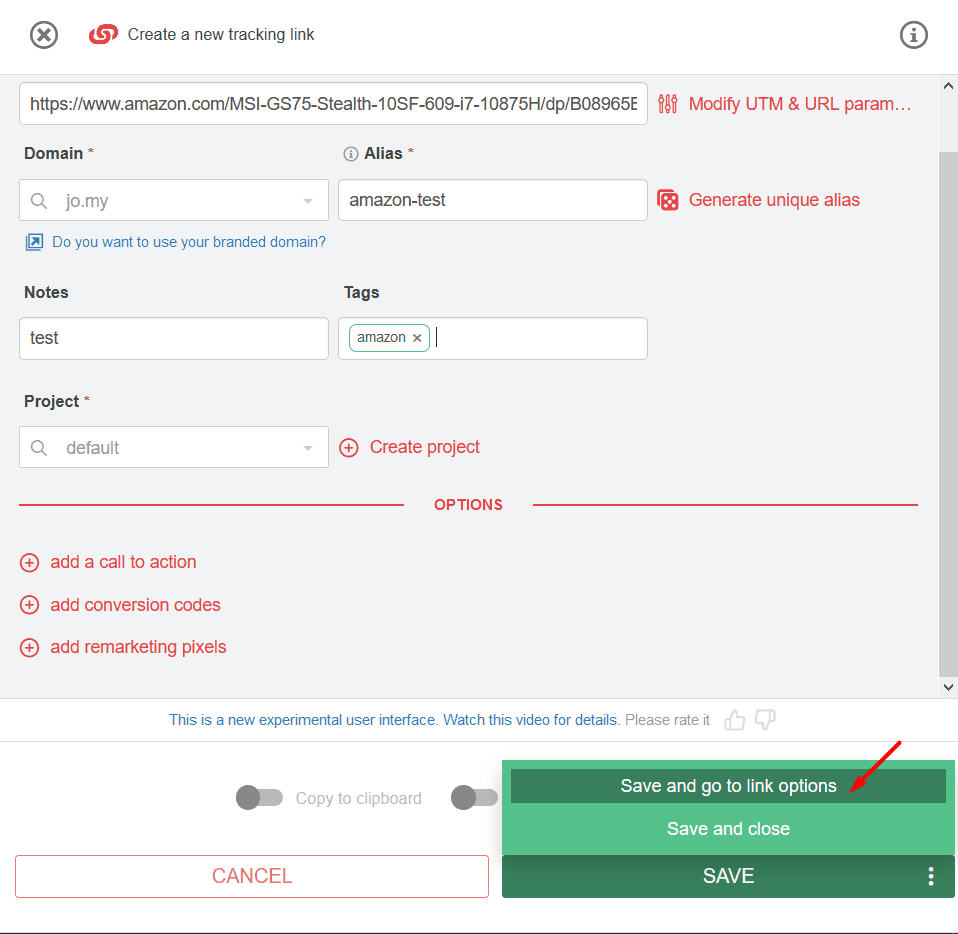
1) Insert the link of the Amazon product page as the destination URL.
2) Choose your domain, we recommend that you use your personal branded domain
3) Add the alias you want. In this way, despite having a very long Instagram link, you can shorten it, making the destination of your Deep Link to Amazon immediately clear.
Making a branded link can improve the CTR of your links by more than 34%
It can also prevent your links from being banned or penalized on social networks during your advertising campaigns.
Creating short links can be vital, especially if you intend to share them by phone.
Considering that the number of Amazon mobile users is increasing in 2020, shortening your links and branding them can improve your visibility and link trust.
4) Insert tags and notes to identify your links within your projects.
5) Click on the “Save and go to Link Options” button.
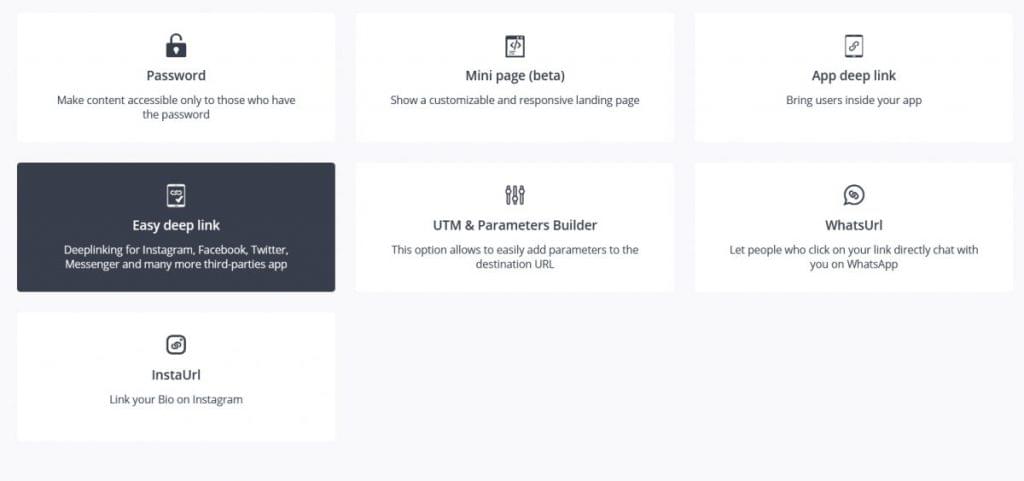
At this point click the box called: Easy Deep Link.
Within this Feature you can immediately create your Deep Link to Amazon.

As you can see, our JotUrl engine has already been able to understand that your destination URL belongs to Amazon, and has already preset the fields within the page without you having to touch anything.
If you wish to make any changes you are free to do so.
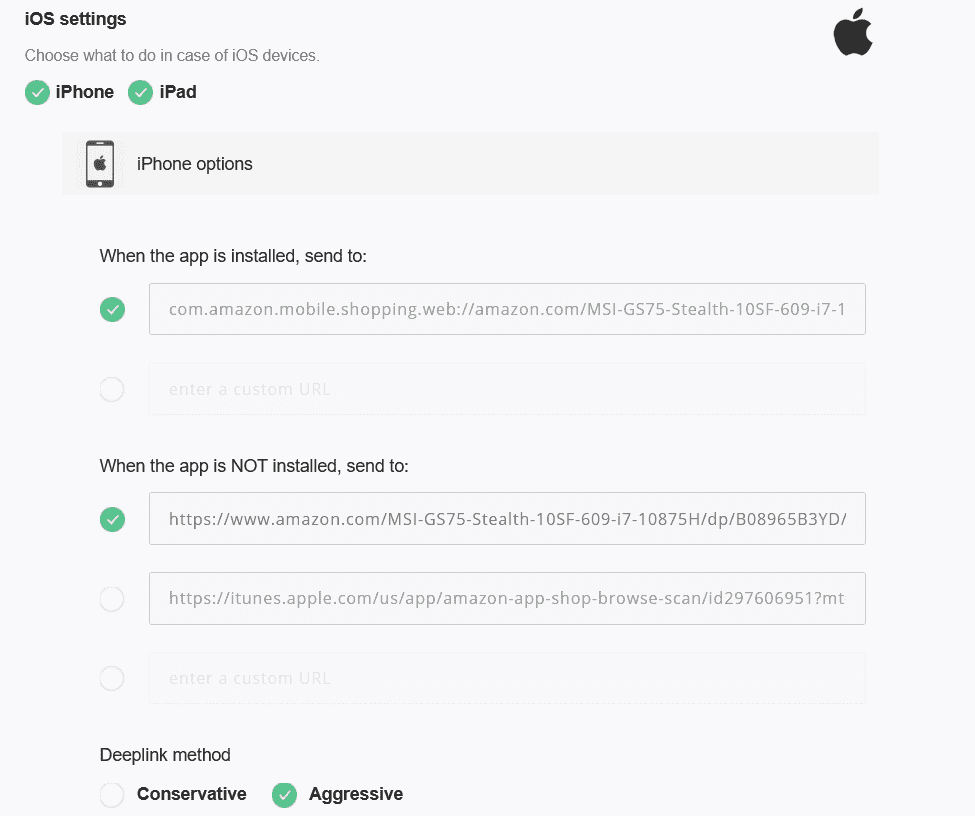
Within this page you can check the behavior of your Deep Link to Amazon on both Android and iOS devices.
You can also set alternative landing pages if the Amazon App is not installed on your user’s device.

If your users haven’t the Amazon App installed, you will have the following options:
– Redirect them to the browser Amazon product page/URL, it cannot be viewed in the Mobile App, but only from the page of the search engine used (Google, Firefox, etc.)
– Redirect them to the App Store / Play Store to download the Amazon App
– Redirect them to a custom page chosen by you.
Within the settings for Android devices, you can force the opening of your link via the browser, however this procedure is not yet available for iOS.
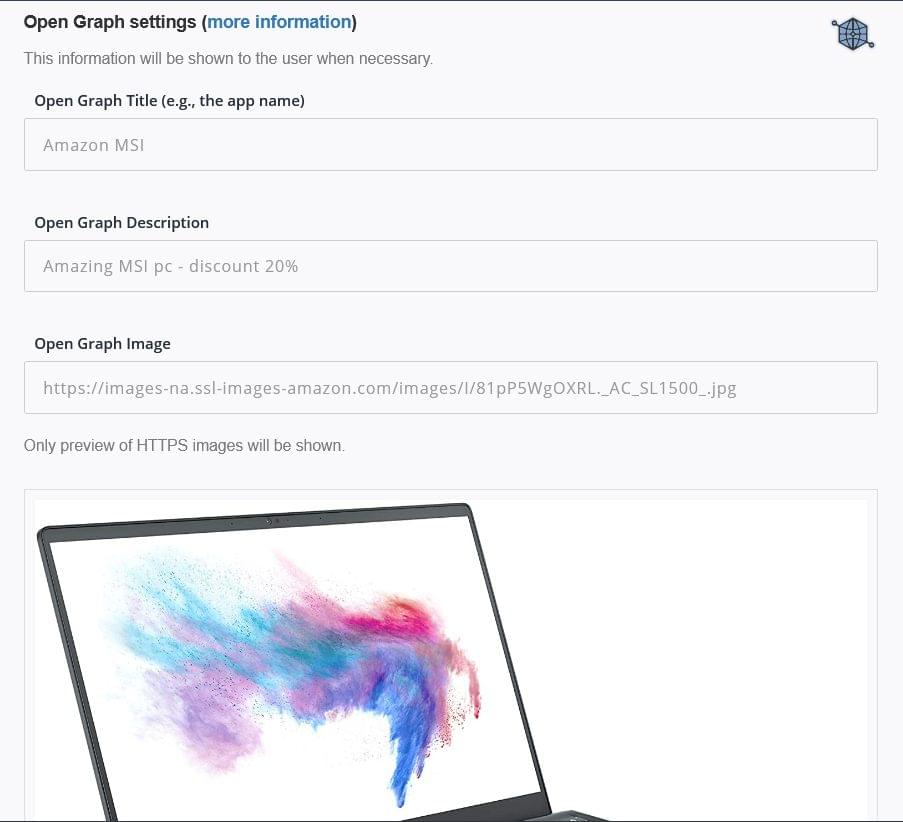
Finally, you can also improve the graphic preview of your link through the Open Graph settings. You can choose the title, description and even the image with which you want to advertise your product. This way your Deep Link will be even more effective.
Once you have selected the Open Graph settings you can save your Deep Link to Amazon.
Now you can copy and paste your Tracking Link and bring as many followers as possible to interact with you on your Amazon product page.

By offering your users valuable content you will gain visibility and credibility and in the meantime you can analyze really important data on their habits and their browsing.
You can try to make a Deep Link to Amazon too.
JotUrl has a 14-day free-trial in which you can test all the features you want.
Cheers!
JotUrl Team


